SysOperation Framework Done Right — A Clean, Reusable Pattern for D365 F&O
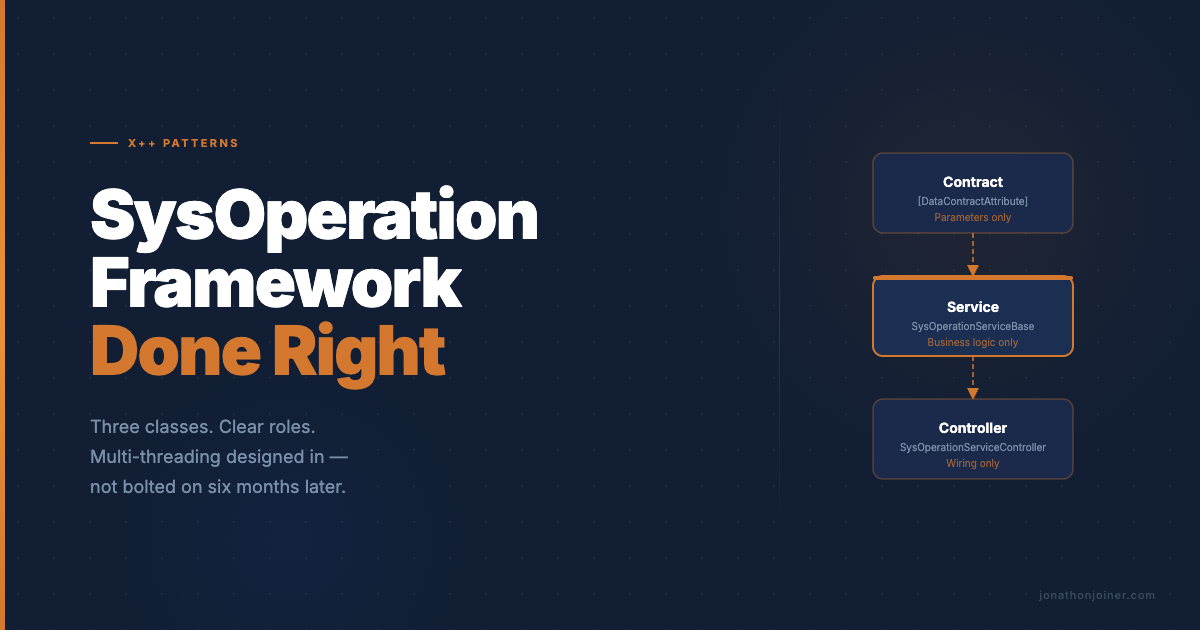
TL;DR — SysOperation is three classes: a contract that holds parameters, a service that does the work, and a controller that wires them together. Keep business logic out of the controller, keep infrastructure out of the service, and validate in the contract. That’s the whole pattern.
I’ve inherited a lot of SysOperation code. Some of it is clean. Most of it isn’t. I’ve seen contracts used as orchestrators, controllers stuffed with database queries, and services that reach back into the dialog to pull parameters. It works — sort of — until someone tries to extend it, test it, or debug a production issue at 2 AM.
SysOperation isn’t a complicated framework. The pattern it enforces is actually elegant once you internalize the roles. The problem is that the framework doesn’t prevent you from doing the wrong thing, so the wrong things accumulate until the class is a mess that nobody wants to touch.
This is the reference I keep meaning to write. A clean, minimal implementation you can use as a template, and the common mistakes you should be actively watching for.
Why SysOperation and Not RunBase
RunBase has been the AX/D365 batch framework since the beginning. It works, but it’s a single-class design — parameters, dialog, and business logic all live together. For simple jobs that’s manageable. For anything with real complexity, it becomes a tangle of doUpdate methods and in-memory state that’s hard to read and harder to test.
SysOperation separates concerns at the framework level:
- Contract — parameters only
- Service — business logic only
- Controller — UI and execution plumbing
The framework handles serialization, batch scheduling, and dialog generation automatically. You get recurrence, batch dependency, and parameter persistence for free — because the framework knows where everything lives. For any new batch job in a modern F&O implementation, SysOperation is the right call. RunBase is for legacy code you haven’t migrated yet.
The Three Classes
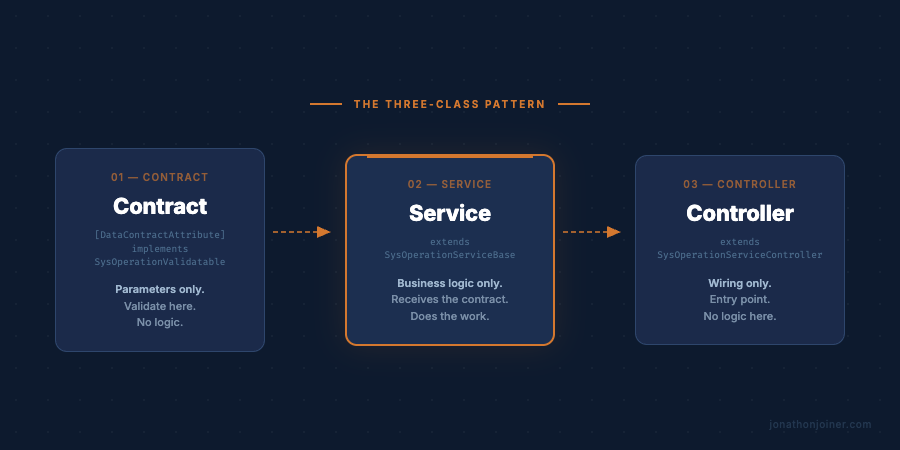
I’ll use a realistic but simple example throughout: a batch job that updates sales prices for items in a given item group by a specified markup percentage. Simple enough to read, realistic enough to be useful.
The Contract
The contract holds your parameters. Nothing else. It’s decorated with [DataContractAttribute] and each field is exposed via a parm method with [DataMemberAttribute].
The framework serializes this class to store batch job parameters — that’s what makes batch recurrence work. Parameters survive across executions because they’re stored as a serialized contract. Design accordingly.
Put your validation here. The contract knows what valid parameters look like. The service shouldn’t be responsible for that check.
[DataContractAttribute, SysOperationAlwaysInitializeAttribute]
class PriceUpdateContract implements SysOperationValidatable
{
    private ItemGroupId     itemGroupId;
    private Percent         markupPercent;
    private TransDate       effectiveDate;

    [DataMemberAttribute('ItemGroupId')]
    public ItemGroupId parmItemGroupId(ItemGroupId _itemGroupId = itemGroupId)
    {
        itemGroupId = _itemGroupId;
        return itemGroupId;
    }

    [DataMemberAttribute('MarkupPercent')]
    public Percent parmMarkupPercent(Percent _markupPercent = markupPercent)
    {
        markupPercent = _markupPercent;
        return markupPercent;
    }

    [DataMemberAttribute('EffectiveDate')]
    public TransDate parmEffectiveDate(TransDate _effectiveDate = effectiveDate)
    {
        effectiveDate = _effectiveDate;
        return effectiveDate;
    }

    public boolean validate()
    {
        boolean isValid = true;

        if (!itemGroupId)
        {
            isValid = checkFailed("Item group is required.");
        }

        if (markupPercent <= 0)
        {
            isValid = checkFailed("Markup percentage must be greater than zero.");
        }

        if (!effectiveDate)
        {
            isValid = checkFailed("Effective date is required.");
        }

        return isValid;
    }
}
Two interface notes worth understanding before you move on:
[SysOperationAlwaysInitializeAttribute] works in tandem with SysOperationInitializable. When your contract implements SysOperationInitializable, it gets an initialize() method where you set default parameter values. Without the attribute, initialize() only fires when no saved values exist in SysLastValue — so the user’s last-used values are remembered across runs. With the attribute, initialize() fires every time the dialog opens, resetting to your defined defaults regardless of what the user entered last time. Choose based on whether consistent defaults or sticky user preferences make more sense for the job.
SysOperationValidatable is the interface that declares the validate() contract shown above. Implementing it is what tells the framework to call your validation when the user clicks OK.
The parm methods follow the standard X++ convention: call with no argument to get, call with an argument to set. Don’t deviate from this pattern — the framework relies on it for serialization. The DataMemberAttribute string is the key used during serialization, so keep it stable even if you rename the field.
The Service
The service does the work. It receives the contract, trusts that it’s been validated, and processes.
class PriceUpdateService extends SysOperationServiceBase
{
    public void processItems(PriceUpdateContract _contract)
    {
        InventTable         inventTable;
        InventTableModule   inventTableModule;
        int                 updateCount;

        if (!_contract.validate())
        {
            return;
        }

        updateCount = 0;

        ttsbegin;

        while select inventTable
            where inventTable.ItemGroupId == _contract.parmItemGroupId()
        {
            select forupdate inventTableModule
                where inventTableModule.ItemId    == inventTable.ItemId
                   && inventTableModule.ModuleType == ModuleInventPurchSales::Sales;

            if (inventTableModule.RecId)
            {
                inventTableModule.Price = inventTableModule.Price
                    * (1 + _contract.parmMarkupPercent() / 100);
                inventTableModule.PriceDate = _contract.parmEffectiveDate();
                inventTableModule.update();

                updateCount++;
            }
        }

        ttscommit;

        info(strFmt("Price update complete. %1 item(s) updated for group: %2",
            updateCount,
            _contract.parmItemGroupId()));
    }
}
A few things worth noticing:
- The service extends
SysOperationServiceBase. This gives you batch-aware logging and base methods you’d otherwise write yourself. It’s not strictly mandatory, but always extend it. - The service calls
_contract.validate()defensively at entry. The controller will have already called it, but the service shouldn’t assume that. Services can be called from other contexts. - The transaction wraps the entire operation. For small datasets this is correct. For large volumes, design for per-chunk commits — but make that a deliberate choice, not an afterthought.
- The
info()at the end gives the user real feedback. Count your records. Tell them what happened.
The service method signature matters: the framework uses reflection to match the contract to the method by parameter type. One method, one contract. If you find yourself needing to pass multiple contracts, you’ve probably designed the contract wrong.
The Controller
The controller wires everything together. It tells the framework which service to call, which method, and what caption to display in batch job administration.
class PriceUpdateController extends SysOperationServiceController
{
    protected void new()
    {
        super(
            classStr(PriceUpdateService),
            methodStr(PriceUpdateService, processItems),
            SysOperationExecutionMode::ScheduledBatch);
    }

    public ClassDescription defaultCaption()
    {
        return "Update Item Prices";
    }

    public static PriceUpdateController construct(
        SysOperationExecutionMode _executionMode = SysOperationExecutionMode::ScheduledBatch)
    {
        PriceUpdateController controller = new PriceUpdateController();
        controller.parmExecutionMode(_executionMode);
        return controller;
    }

    public static void main(Args _args)
    {
        PriceUpdateController controller = PriceUpdateController::construct();
        controller.parmArgs(_args);
        controller.startOperation();
    }
}
That’s it. The controller should be about this long. If yours is 150 lines, something has gone wrong — business logic has leaked in from somewhere.
startOperation() handles the dialog, parameter collection, validation, and execution — synchronous or batch, depending on how the user configured it. You don’t write any of that. The framework handles it because you told it where the contract and service live.
The Action Menu Item
The controller’s main() is the entry point, but nobody can reach it without a menu item. In the AOT, create an Action Menu Item and set three properties:
<AxMenuItemAction>
    <Name>PriceUpdateBatch</Name>
    <Label>Update Item Prices</Label>
    <Object>PriceUpdateController</Object>
    <ObjectType>Class</ObjectType>
</AxMenuItemAction>
ObjectType must be Class. Object points at your controller. When a user clicks the menu item, D365 calls PriceUpdateController::main(Args _args), which calls construct(), which calls startOperation() — the dialog appears.
Add the menu item to whatever menu makes sense for your module, then create a Security Privilege granting Invoke access on it. Without the privilege, anyone without System Administrator will hit a security error when they try to run the job. Both the menu item and the privilege are AOT objects — one metadata file each, no code.
Design for Multi-Threading from the Start
Here’s the design decision I see deferred most often, and it costs more to fix the longer you wait: whether your SysOperation job runs single-threaded or multi-threaded.
Most jobs start single-threaded. That’s fine. Then volume grows — six months later, a year later — and someone decides the job needs to run in parallel. Now they’re retrofitting multi-threading into a service that was never designed for it. The contract has no partition key. The service method is one large block with no seam to split on. The transaction wraps 50,000 records in a single ttsbegin. Untangling that is painful, and it often introduces subtle data conflicts in the process.
The fix is structural: build the coordinator/worker split into the service from day one, even if you only run one thread initially. It costs almost nothing to set up. It makes the job’s capability and design intent clear to every developer who picks it up after you.
The Coordinator/Worker Pattern
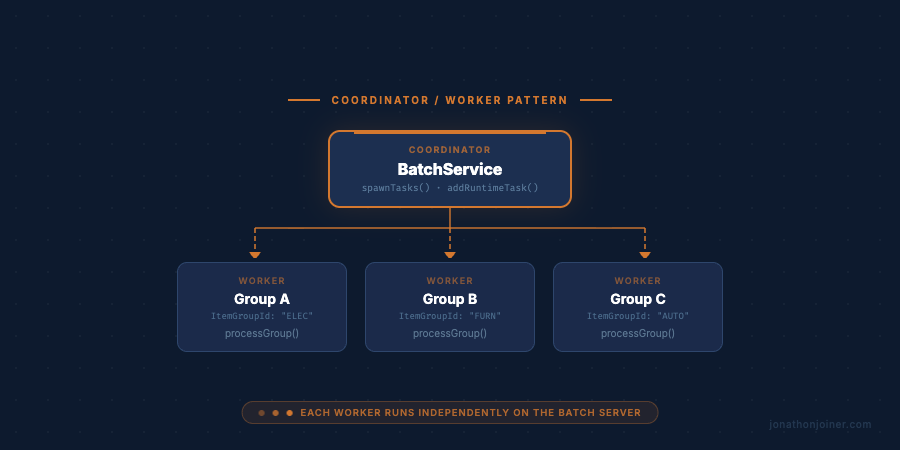
This is pure SysOperation all the way down. The coordinator and every worker follow the same three-class pattern — contract, service, controller. The coordinator’s service spawns worker controllers, passes them parameters through their contracts, and registers them with the batch framework via addRuntimeTask(). The batch server runs them in parallel.
Five objects in play:
- Coordinator service (
coordinate()inPriceUpdateService) — validates parameters, queries the partition data, creates one worker controller per partition, sets its parameters, and registers it withaddRuntimeTask() - Worker controller (
PriceUpdateWorkerController) — thin, just wires the worker service to the worker contract - Worker contract (
PriceUpdateWorkerContract) — holds the partition parameters passed down from the coordinator - Worker service (
PriceUpdateWorkerService) — does the actual price update for its assigned item group - Coordinator controller — points to
coordinate,ScheduledBatchmode
The coordinator (inside PriceUpdateService):
public void coordinate(PriceUpdateContract _contract)
{
    BatchHeader                 batchHeader;
    InventItemGroup             itemGroup;
    PriceUpdateWorkerController workerController;
    PriceUpdateWorkerContract   workerContract;
    RecId                       currentTaskId;

    if (!_contract.validate())
    {
        return;
    }

    batchHeader   = BatchHeader::getCurrentBatchHeader();
    currentTaskId = BatchHeader::getCurrentBatchTask().RecId;

    while select itemGroup
        where itemGroup.ItemGroupId == _contract.parmItemGroupId()
    {
        workerController = new PriceUpdateWorkerController();
        workerContract   = workerController.getDataContractObject();

        workerContract.parmItemGroupId(itemGroup.ItemGroupId);
        workerContract.parmMarkupPercent(_contract.parmMarkupPercent());
        workerContract.parmEffectiveDate(_contract.parmEffectiveDate());

        batchHeader.addRuntimeTask(workerController, currentTaskId);
    }

    batchHeader.save();
}
getDataContractObject() retrieves the worker’s contract instance so the coordinator can set the partition parameters on it directly. The framework serializes this contract automatically via [DataContractAttribute] — no pack()/unpack() required.
Passing currentTaskId as the second argument to addRuntimeTask creates an And dependency — each worker task only becomes eligible once the coordinator task itself completes. Pass 0 if you want workers to be eligible for scheduling as soon as they’re registered.
Production note: In this example,
coordinate()lives alongsideprocessItems()in the samePriceUpdateServiceclass for clarity. In a real implementation, split them: put the coordinator logic in its ownPriceUpdateBatchService(with aspawnTasks()method) and point the coordinator controller at that class. Keeping the single-threaded service and the coordinator service separate maintains single responsibility and avoids a class that does two structurally different things depending on which controller calls it.
The worker controller — thin, as always:
class PriceUpdateWorkerController extends SysOperationServiceController
{
    protected void new()
    {
        super(
            classStr(PriceUpdateWorkerService),
            methodStr(PriceUpdateWorkerService, processGroup),
            SysOperationExecutionMode::ScheduledBatch);
    }
}
The worker contract — holds the partition slice passed down from the coordinator. No dialog attributes needed here — this contract is never shown to a user:
[DataContractAttribute]
class PriceUpdateWorkerContract
{
    private ItemGroupId     itemGroupId;
    private Percent         markupPercent;
    private TransDate       effectiveDate;

    [DataMemberAttribute('ItemGroupId')]
    public ItemGroupId parmItemGroupId(ItemGroupId _itemGroupId = itemGroupId)
    {
        itemGroupId = _itemGroupId;
        return itemGroupId;
    }

    [DataMemberAttribute('MarkupPercent')]
    public Percent parmMarkupPercent(Percent _markupPercent = markupPercent)
    {
        markupPercent = _markupPercent;
        return markupPercent;
    }

    [DataMemberAttribute('EffectiveDate')]
    public TransDate parmEffectiveDate(TransDate _effectiveDate = effectiveDate)
    {
        effectiveDate = _effectiveDate;
        return effectiveDate;
    }
}
The worker service — does the actual update for its assigned item group:
class PriceUpdateWorkerService extends SysOperationServiceBase
{
    public void processGroup(PriceUpdateWorkerContract _contract)
    {
        InventTable         inventTable;
        InventTableModule   inventTableModule;
        int                 updateCount;

        updateCount = 0;

        ttsbegin;

        while select inventTable
            where inventTable.ItemGroupId == _contract.parmItemGroupId()
        {
            select forupdate inventTableModule
                where inventTableModule.ItemId    == inventTable.ItemId
                   && inventTableModule.ModuleType == ModuleInventPurchSales::Sales;

            if (inventTableModule.RecId)
            {
                inventTableModule.Price = inventTableModule.Price
                    * (1 + _contract.parmMarkupPercent() / 100);
                inventTableModule.PriceDate = _contract.parmEffectiveDate();
                inventTableModule.update();

                updateCount++;
            }
        }

        ttscommit;

        info(strFmt("Group %1 complete — %2 item(s) updated.",
            _contract.parmItemGroupId(), updateCount));
    }
}
The coordinator controller — points to coordinate, ScheduledBatch mode:
protected void new()
{
    super(
        classStr(PriceUpdateService),
        methodStr(PriceUpdateService, coordinate),
        SysOperationExecutionMode::ScheduledBatch);

    this.parmDialogCaption("Update Item Prices");
}
ScheduledBatch is the correct execution mode here. It routes execution through the batch server framework — which is what BatchHeader::getCurrentBatchHeader() and addRuntimeTask() require to work. The user-facing experience is the same: same dialog, same batch scheduling, same recurrence options. Behind the scenes, the job fans out into parallel worker tasks — one per item group — each running independently on the batch server’s thread pool.
Thread Safety Through Partitioning
D365 F&O doesn’t give you mutexes or synchronization primitives at the X++ level. Thread safety in a batch job comes from one thing: non-overlapping data ownership. Each task is responsible for a slice of the data that no other task can touch.
In this example, each task owns exactly one item group. An item belongs to one group. InventTableModule records are unique per item. So task 1 updating group ELECTRONICS and task 2 updating group FURNITURE cannot possibly touch the same row — there’s no conflict by design.
Choose your partition key with this in mind. It needs to be a dimension where record ownership is exclusive:
- Item group — if items don’t span groups
- Legal entity — each task runs in its own
changeCompanyscope - Vendor or customer group
- A numeric range (batch number, account number prefix) if you’re partitioning a large homogeneous dataset
The partition key doesn’t have to live in the contract as-is. Sometimes you build a staging table in the coordinator that maps chunk IDs to record ranges, then pass the chunk ID to each worker. The pattern is the same — the partition key defines who owns what.
What Breaks Thread Safety
Partitioning handles most conflicts, but there are a few patterns that will bypass it and cause problems:
Shared aggregate records. If multiple tasks converge on the same summary row — a ledger account balance, an inventory journal header, a totals table — you’ll get update conflicts or silent overwrites. The coordinator should handle anything that touches shared state; workers should only touch the records they own.
Number sequences. Concurrent tasks requesting the same number sequence under load can deadlock or generate duplicates depending on how the sequence is configured. If your worker calls NumberSeq::newGetNum(), make sure the sequence is set up for concurrent use, or pre-allocate number blocks in the coordinator and pass the range to each worker.
Ordering assumptions. Parallel tasks don’t finish in a predictable order. If your process has an implied sequence — “group A must complete before group B” — multi-threading will break it. Either enforce that sequence via batch task dependencies, or redesign so the order doesn’t matter.
Design the worker so the correct outcome is independent of which tasks finish first and in what order. If it doesn’t hold up to that test, the partitioning strategy needs rethinking.
Common Mistakes I See in the Wild
Bloated contracts
The contract gets stuffed with helper methods, calculated properties, database lookups, and initialization logic that has nothing to do with storing parameters. I’ve seen contracts with 300-line init() methods querying five tables.
The contract is a data transfer object. It holds values. If you need to compute something from the parameters, do it in the service. If you need default values on the dialog, implement SysOperationInitializable on the contract and set them in initialize(). Don’t mix those concerns into the contract.
Business logic in the controller
The controller is plumbing. I’ve seen controllers that run the database queries, compute aggregates, and fire emails — all before calling the service, or sometimes instead of calling the service at all. If you’re writing SQL in the controller, stop. Move it to the service.
This matters because business logic in the controller is untestable. The controller is tightly coupled to the dialog and the execution context. The service isn’t — you can call it directly in a test, pass a contract, and assert on the results. Business logic deserves that testability.
Skipping validation
Batch jobs run unattended. When a parameter is wrong and nobody checked, the job either silently does nothing or throws an unhandled exception on a schedule. Neither is acceptable.
Put validation in the contract’s validate() method and use checkFailed() — not just return false. checkFailed() posts the message to the Infolog so the user actually knows what went wrong.
// Wrong — silent failure
if (!itemGroupId)
{
    return false;
}

// Right — the user gets a real message
if (!itemGroupId)
{
    isValid = checkFailed("Item group is required.");
}
Not thinking about restartability
If your batch processes 10,000 records and fails on record 9,000 inside a single transaction, everything rolls back. You’re starting from zero on the next run. Sometimes that’s acceptable. Often it isn’t, especially if the job runs during a maintenance window.
For large-volume jobs, process in chunks. Commit per chunk. Log progress using SysOperationProgress if it’s a long-running operation. At minimum, design your service so that re-running it on already-processed records is safe — idempotent where you can make it so.
Using string literals in the controller
// Wrong — renames will break this silently
this.parmClassName("PriceUpdateService");
this.parmMethodName("processItems");

// Right — the compiler catches renames
this.parmClassName(classStr(PriceUpdateService));
this.parmMethodName(methodStr(PriceUpdateService, processItems));
classStr and methodStr are compile-time intrinsic functions. The moment you rename the class or method, the compiler tells you. Hard-coded strings don’t tell you anything until the job fails at runtime.
The Golden Rule Checklist
Before you call a SysOperation implementation done:
- Contract holds parameters only. No business logic, no database calls, no helper methods beyond
parmandvalidate(). -
validate()is implemented and posts real messages viacheckFailed(), not silentreturn false. - The service validates the contract at entry — even if the controller already did.
- Transaction scope is intentional. You chose where
ttsbegin/ttscommitlive on purpose. -
classStrandmethodStrare used in the controller, not string literals. - The controller is short. If it’s long, business logic has leaked out of the service. Find it and move it.
- Multi-threading is designed in, not bolted on. Coordinator/worker split is in place. Partition key is defined. Each worker contract holds a non-overlapping slice. Each worker service owns its records exclusively.
The Pattern Holds Up
I’ve used this exact structure on one-parameter batch jobs and on jobs processing hundreds of thousands of records across multiple legal entities. The shape doesn’t change. The contract stays clean, the service handles the complexity, and the controller stays out of the way.
What makes it work is discipline. The framework enables separation — it doesn’t enforce it. That part is on you.
Copy this structure. Name everything after what it does (PriceUpdateWorkerService, not MyHelperClass2). Build the coordinator/worker split into the service from the start, even if you only run one partition on day one. The developer who comes behind you — or the you of twelve months from now trying to parallelize a job that’s grown to a million records — will thank you for it.
Batch jobs in D365 tend to accumulate decisions made under pressure and never revisited. If your SysOperation implementations have grown into something nobody wants to open, that’s a structure problem, not a framework problem. Structure problems are fixable. If that friction sounds familiar, let’s talk.